
Are you looking for ways to hide your location online? Many people want to conceal their digital footprint, often starting with their ip address, which reveals their country. Whether for privacy, accessing restricted content, or enhancing security, understanding how to mask your origin is crucial.
A VPN is one of the most effective tools for this purpose, but it’s not the only one. This guide will explore reliable methods to help you regain control over your online presence.
- Subscribe to a VPN Service and Install Its Application.
- Launch the App and Connect to a Server.


What does “hide your country online” mean?
Hiding your country online primarily means masking your Internet Protocol (IP) address. Your IP address is a unique numerical label assigned to your device by your Internet Service Provider (ISP). It functions like a digital mailing address, revealing your approximate geographical location, often down to the city and country level.
When you visit a website, send an email, or use an online service, your IP address is transmitted so that the data you request can be sent back to you. Websites and services use this information to determine your location.
Therefore, “hiding your country” involves using a tool or method that prevents websites from seeing your real IP address. Instead, they see a different IP address, one associated with a different geographical location. For instance, if you are in the United States, you can use a tool to make it appear as though you are accessing the internet from the United Kingdom.
What’s the merits to “hide your country online”?
Concealing your online location offers several significant benefits, ranging from personal privacy to unrestricted internet access.
- Enhance your online privacy
- Bypass geo-restrictions
- Security
- Avoid price discrimination
Enhance your online privacy
The primary merit is enhance your online privacy. By masking your true location, you prevent websites, advertisers, and potentially your ISP from tracking your physical location and building a profile based on your browsing habits. This reduces targeted advertising and minimizes your digital footprint.
Bypass geo-restrictions
Another major advantage is the ability to bypass geo-restrictions. Many streaming services, news websites, and online platforms restrict content based on the user’s country. By making it appear you are in a different country, you can access content libraries or services that would otherwise be unavailable. For example, you could access your home country’s streaming catalog while traveling abroad.
Security
Security is also a key benefit, especially when using tools like VPNs that encrypt your traffic. This encryption protects your data from being intercepted by malicious actors, particularly on unsecured public Wi-Fi networks.
Avoid price discrimination
Furthermore, hiding your location can help avoid price discrimination. Some e-commerce sites, airlines, and hotel booking platforms adjust prices based on the user’s perceived location. By changing your virtual country, you may be able to find better deals.
The tools can help you hide your country online?
Several tools can obscure your IP address, but they differ significantly in terms of security, speed, and ease of use.
Tor
Tor (The Onion Router) is a free, open-source network designed for anonymous communication. It directs your internet traffic through a worldwide, volunteer overlay network consisting of thousands of relays.
It works by encrypting your data in multiple layers (like an onion) and bouncing it through several random relays before it reaches its final destination. This process makes it extremely difficult for anyone to trace the traffic back to its original source.
The main advantage of Tor is its high level of anonymity. However, this robust process comes at the cost of speed; Tor is often significantly slower than other methods, making it unsuitable for streaming or large downloads. Additionally, some websites block traffic originating from the Tor network.
Proxy
A proxy server acts as an intermediary between your device and the internet. When you use a proxy, your traffic is routed through the proxy server, and your real IP address is replaced with the proxy server’s IP address.
There are various types of proxies, such as HTTP proxies (for web browsing) and SOCKS5 proxies (for more general traffic). They can be effective for simple location masking.
However, many proxies, especially free ones, do not encrypt your traffic. This means that while your location is hidden, your data (like passwords or browsing history) could be visible to the proxy operator or other third parties. Reliable proxies often require technical setup and may still be slower than a direct connection.
VPN
A VPN (Virtual Private Network) is currently the most popular and balanced solution for hiding your location. A VPN creates a secure, encrypted “tunnel” between your device and a remote server operated by the VPN provider.
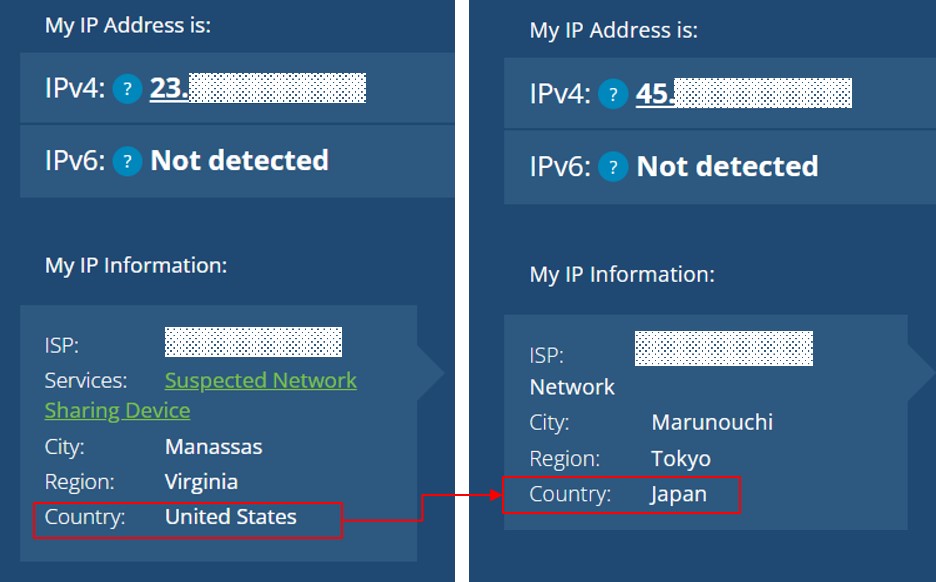
All your internet traffic is routed through this tunnel. Your real IP address is hidden and replaced with the IP address of the VPN server you connect to. For example, connecting to a server in Japan will make all your traffic appear to originate from Japan.
Unlike most proxies, a VPN encrypts your entire connection. This means your ISP, government agencies, or hackers on a public Wi-Fi network cannot see what you are doing online.
The most simple tool to “hide your country online”—VPN
While Tor offers superior anonymity and proxies offer basic IP masking, a VPN provides the best combination of security, speed, and ease of use, making it the simplest and most practical tool for most users.
The primary reason for its simplicity is the user experience. Reputable VPN services provide dedicated applications for computers, smartphones, and other devices. Hiding your country is as simple as opening the app, selecting a country from a list, and clicking a “connect” button. There is no complex configuration required, unlike setting up Tor or reliable proxies.
Furthermore, a VPN protects your entire internet connection, not just your web browser. This includes apps, games, and background processes.
In terms of performance, premium VPNs invest heavily in high-speed server networks. While Tor drastically slows down your connection, a good VPN has a minimal impact on speed, allowing for smooth streaming, gaming, and downloading. Finally, the strong encryption provided by a VPN offers comprehensive security, a feature often lacking in proxy servers.
How to use VPN to “hide your country online”
Using a VPN is a straightforward process that can be completed in just a few minutes.
- Subscribe to a VPN Service like ExpressVPN and Install Its Application.
- Launch the App and Connect to a Server.
Step 1: Subscribe to a VPN Service and Install Its Application
First, you need to choose a reputable, paid VPN provider. While free VPNs exist, they often have significant drawbacks, which will be discussed later. Look for a provider with a clear “no-logs” policy (meaning they don’t track your activity), strong encryption, and servers in the countries you wish to connect to.
Once you have selected a service, visit its official website to create an account and subscribe to a plan. After subscribing, download the VPN application designed for your device (e.g., Windows, macOS, Android, or iOS) and follow the installation instructions.
Here, we’ll use the industry-leading service ExpressVPN as an example.
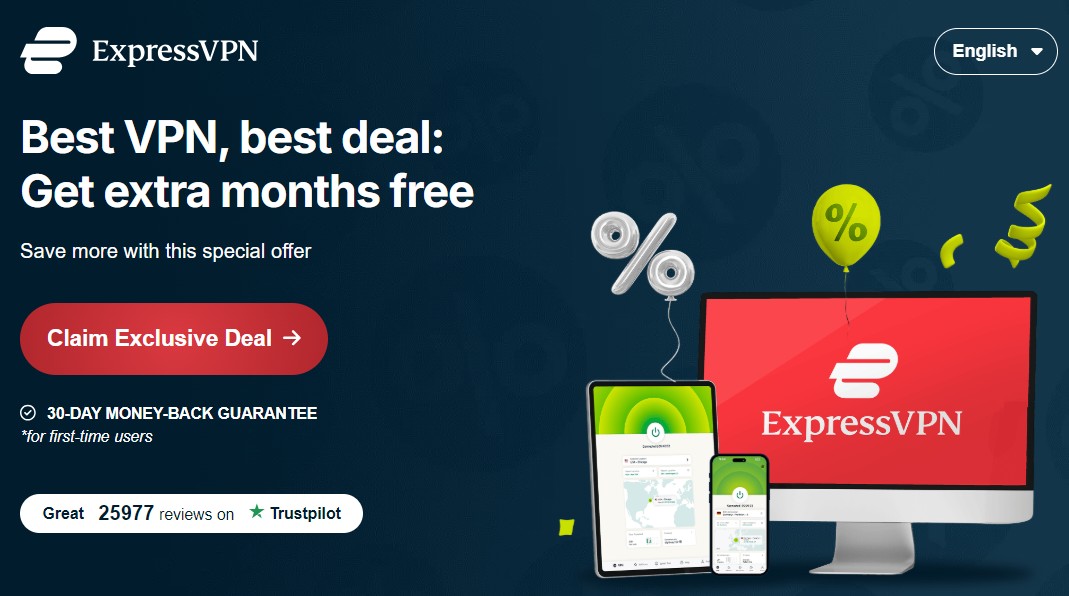
To register with ExpressVPN , click the “Claim Exclusive Deal” button as shown below. After the price plan is shown, follow the instructions.
Step 2: Launch the App and Connect to a Server
After installation, open the application and log in using the credentials you created during sign-up.
You will typically see a large “connect” button and a list of available server locations. To hide your country, simply browse the list and select a server in a different country. For example, if you are in United States and want to appear as if you are in Japan, you would select a server in Japan.
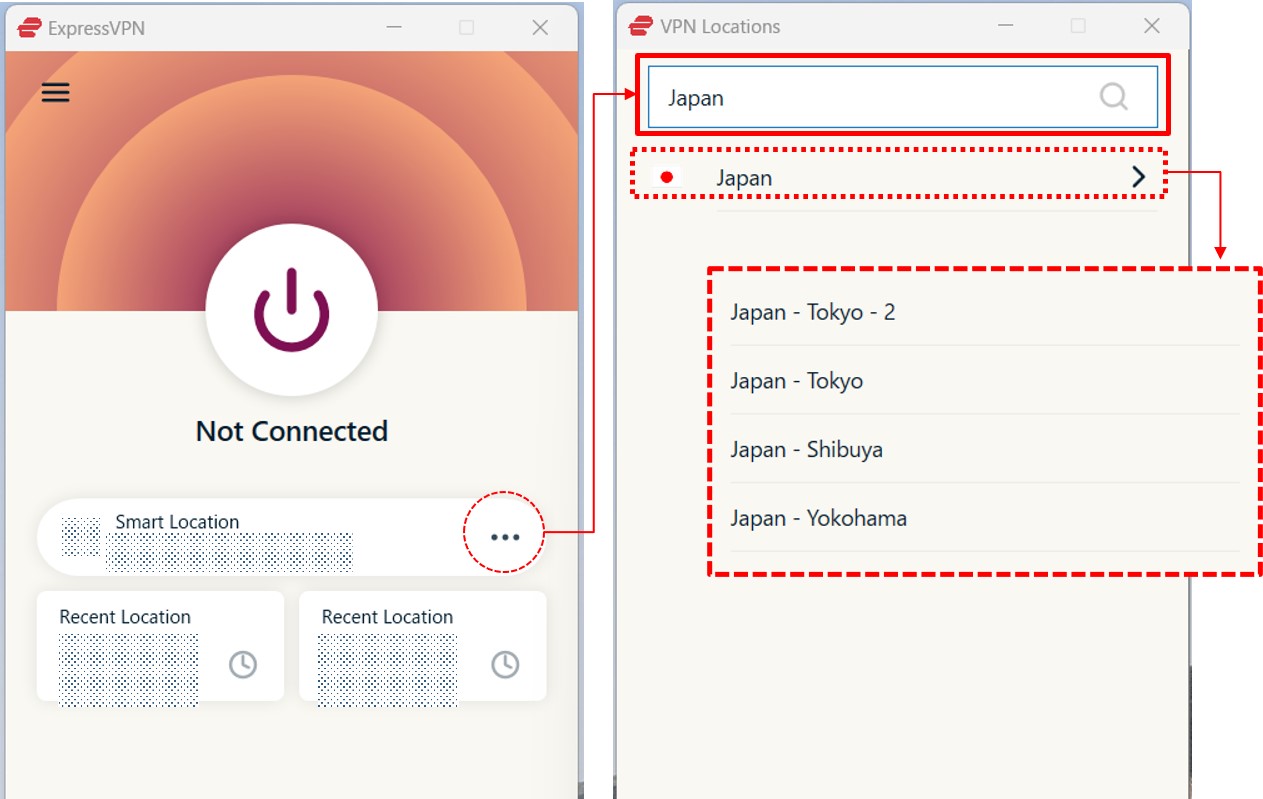
Click the connect button. The app will establish a secure, encrypted connection to that server. Once connected, your real IP address is hidden, and you will appear to be browsing from the country of the server you selected.
Recommended VPN Services to Hide Your Country Online
Choosing the right VPN is essential for a secure and smooth experience. Here are some of the most reliable services available, known for their speed, security, and trustworthiness.
| ExpressVPN | NordVPN | SurfShark | |
| Prices | 1-Month: $13.99 12-Months: $5.99/month 24-Months: $4.49/month | 1-Month: $11.99 12-Months: $4.99/month 24-Months: $3.99/month | 1-Month: $12.95 12-Months: $3.99/month 24-Months: $2.39/month |
| Money-back Guarantee | 30 days | 30 days | 30 days |
| Countries | 105 | 118 | 100 |
| Servers | 3,000+ | 7,000+ | 3,200+ |
| Maximum devices supported | 12 | 10 | Unlimited |
| Connection Speed | Ultra Fast | Fast | Fast |
| Security | AES-256 Kill Switch | AES-256 Kill Switch | AES-256 Kill Switch |
| Privacy | No-logging | No-logging | No-logging |
| Support | 24/7 Live Chat Support | 24/7 Live Chat Support | 24/7 Live Chat Support |
ExpressVPN: Ultra-fast Internet Speeds
| Prices | 1-Month: $13.99 12-Months: $5.99/month 24-Months: $4.49/month |
| Money-back Guarantee | 30 days |
| Countries | 105 |
| Servers | 3,000+ |
| Maximum devices supported | 12 |
ExpressVPN offers some of the fastest internet speeds among the VPNs we have used. All VPNs may slow down your internet connection, but ExpressVPN is one of the fastest, and you rarely notice the difference. Review sites consistently rank ExpressVPN as one of the fastest VPNs. Additionally, with over 3,000 servers in 105 countries, you have a wide choice of countries to change IP addresses to. Real humans are available 24-hour live chat support to help you with setup and troubleshooting. ExpressVPN also has a no-log policy.
After you’ve registered with ExpressVPN, you can use it to easily browse the internet just by downloading their app.
- Excellent speed and stability
- Fast and user-friendly app
- Strict no-logs policy
- Wide range of server countries
- Accepts Bitcoin payments
- Slightly more expensive than competitors
- Place a high importance on internet speed
\30 day Money-Back Guarantee/
NordVPN: The Ultimate Balance of Price and Internet Speed
| Prices (standard plan) | 1-Month: $11.99 12-Months: $4.99/month 24-Months: $3.99/month |
| Money-back Guarantee | 30 days |
| Countries | 118 |
| Servers | 7,000+ |
| Maximum devices supported | 10 |
NordVPN’s excellent service, and balance of price, internet speed, servers, and countries, has allowed it to gain the greatest market share in the world. Overall, NordVPN consistently receives great reviews from leading experts. NordVPN has more than 5,800 servers in 60 countries, so you also have a lot of choices for which country to change your IP address to. You can et help and advice from our friendly customer support team through email or live chat for your 24/7. And NordVPN also has a no-log policy.
After you’ve registered, you can easily browse the internet using NordVPN just by downloading their app.
- World's most popular VPN by new user subscriptions
- Large number of available servers
- Competitive pricing
- Strict no-logs policy
- User-friendly dedicated apps
- Accepts cryptocurrency payments
- Short-term plans can be relatively costly
- Want to balance price and internet speed
\30 day Money-Back Guarantee/
Surfshark: Impressive Performance with a Lower Price
| Prices (standard plan) | 1-Month: $12.95 12-Months: $3.99/month 24-Months: $2.39/month |
| Money-back Guarantee | 30 days |
| Countries | 100 |
| Servers | 3,200+ |
| Maximum devices supported | Unlimited |
Surfshark offers impressive performance with a lower price. You can get Surfshark much cheaper than other services if you apply for the 24-month plan. Furthermore, Surfshark has no connection limits. So, you and your family can connect and use all your devices simultaneously. Surfshark has more than 3,200 servers in 100 countries. Just like the other VPNs, you also have a lot of choices for which country to change your IP address to. Customer support experts are there for you 24/7, if you need a helping hand with them via live chat or email. And SurfsharkVPN also has a no-log policy.
After you’ve registered, you can easily browse the internet using Surfshark by downloading their app.
- Affordable price (cheaper than NordVPN & ExpressVPN)
- Unlimited simultaneous connections (ideal for families)
- Large number of available servers
- Speeds comparable to top-tier providers
- Strict no-logs policy
- Accepts cryptocurrency payments
- Less effective at bypassing geo-restrictions
- Limited service history / Less established
- Who are budget conscious and want to want to connect with lots of devices
\30 day Money-Back Guarantee/
FAQ
Here are answers to some common questions about hiding your country online.
Is it illegal to use a VPN to hide your country online?
In the vast majority of countries, including the United States, Canada, the UK, and most of Europe, using a VPN is perfectly legal. VPNs are legitimate and widely used tools for privacy and security by individuals and corporations alike.
However, the legality of VPNs can vary. A few countries, such as China, Russia, and North Korea, either ban or heavily restrict the use of non-government-approved VPNs.
It is important to note that while using a VPN itself is legal in most places, using a VPN to commit illegal acts (such as copyright infringement or hacking) remains illegal. Always check the specific laws and regulations of your country.
Can I use free VPN service?.
Using a free VPN service is generally not recommended if your goal is privacy and security. Reputable VPNs require significant investment to maintain a fast, secure global server network.
Free VPN providers must cover these costs somehow. They often do this in ways that compromise user privacy. Many free VPNs are known to log user activity and sell this data to advertisers or other third parties. Some free VPN apps have even been found to contain malware or lack proper encryption.
Furthermore, free VPNs typically impose severe limitations, such as slow speeds, monthly data caps, and a very limited selection of servers, which makes them impractical for streaming or regular use. For reliable and secure location masking, a paid service is a necessary investment.
Conclusion
Hiding your country online is an effective way to enhance your digital privacy, bypass geo-restrictions, and improve your online security. While tools like Tor and proxies exist, they often involve compromises in speed or security.
A Virtual Private Network (VPN) stands out as the simplest, most effective, and most reliable method for the average user. It successfully masks your IP address while also encrypting your entire internet connection, offering a balanced solution.
By choosing a reputable provider, such as one of the services recommended above, you can easily and safely control your apparent online location with just a few clicks.
- Subscribe to a VPN Service and Install Its Application.
- Launch the App and Connect to a Server.